Redesigning an Internal Support Tool — and Discovering a Product Worth Selling
A fintech company's customer support team ran on an admin tool built in 2018. No one had ever measured how well it worked — until we did. Over the course of a year, I led research and redesigned the core workflows end-to-end.
The research uncovered a problem nobody had named: support agents weren't escalating to engineers because queries were technically complex. They were escalating because the tool didn't surface what they needed. And by the time we finished, stakeholders were asking a different question: could we sell this?
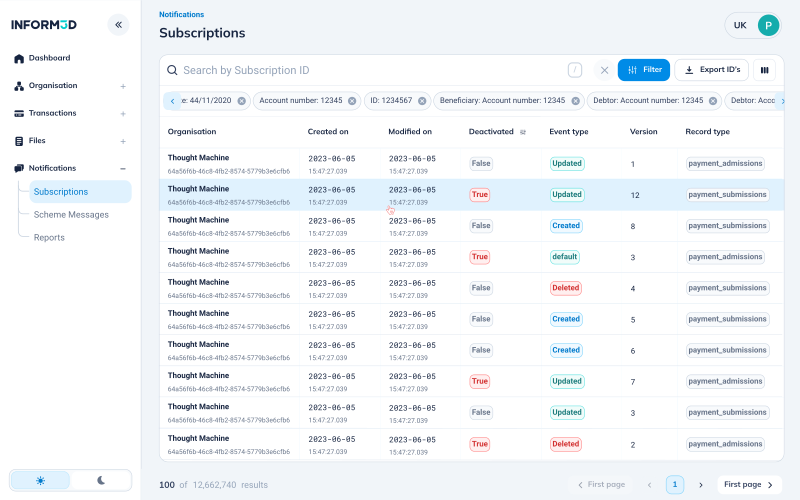
A tool built in 2018. No data collected since. Engineers doing work that wasn't theirs.
The Admin UI was the backbone of customer support operations — used to look up payments, investigate errors, and resolve user queries. It had been built in 2018 and never formally evaluated.
By 2024, 50% of customer queries required engineering involvement. Most weren't technically complex — they were information problems. Support couldn't find what they needed, so they called an engineer.
Is the tool still useful? Are users relying on it daily?
Where are the inefficiencies slowing the team down?
Should the tool be improved or deprecated?
40 surveys. 9 interviews.
Before designing anything, we needed to understand what was actually happening. This was the first time anyone had formally studied how the tool was used.
First-ever usage baseline. Validated frequency, indispensability, primary workflows, and pain points across the full team.
6 from the support team, 3 engineers. Selected from survey respondents who said something unexpected or contradictory — the people most likely to reveal the real problem.
Support relied on engineering when the tool lacked the information needed to investigate issues, turning visibility gaps into engineering work.
Two teams. Opposite needs. One rigid tool that served neither.
Before designing anything, we needed to understand what was actually happening. This was the first time anyone had formally studied how the tool was used.
6 interviewed · Daily users handling payment queries and onboarding issues.
Need: Fast payment search, clear data visibility, efficient navigation.
Reality: Spending too long searching, escalating for information rather than expertise.
3 interviewed · Called in as escalation for queries support couldn't resolve.
Need: Quick access to technical details with minimal friction.
Reality: Resolving information problems, not technical ones — work that shouldn't have reached them.
Give support the right information, and 70% of queries could be solved without engineering.
The opportunity wasn't to build something new, but to make existing tools work better. Three gaps stood between support and self-sufficiency: search speed, data visibility, and role flexibility.
Research revealed a new opportunity: enterprise clients wanted access to their own payment data so they could investigate transactions without contacting support. A customer-facing version could reduce support volume — and potentially become a premium product.
Research first. Then design for the specific workflow, not the generic one.
40-person survey — first-ever documentation of how, when, and why the tool was used.
Mapped the support resolution flow and the engineer escalation flow separately — they had fundamentally different needs.
Multiple rounds on table customization — the most-requested feature across all 9 interviews.
Don't design for edge cases. Design for the 30-second workflow that happens 50 times a day.
Five features. Each tied to a research finding. Every change earned.
Support agents often searched with partial data, while the tool required exact matches. We introduced flexible search, standardized filters, and backend-aligned terminology.
Projected: 10% faster manual search. Aligning terminology with the backend also removed the translation step that often led to engineering escalations.
Aligning terminology with the backend removed a translation step that happened every escalation call.
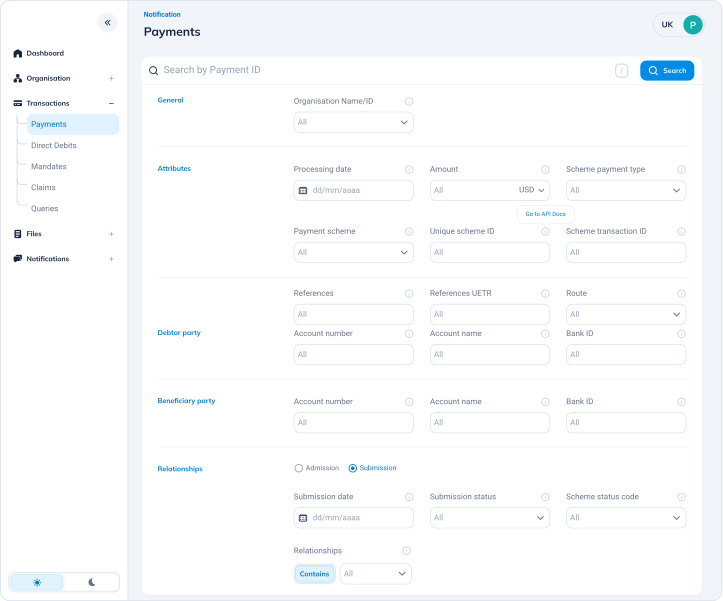
Reducing visual noise to surface the information support needed most.
Key fields were buried in visual noise. We introduced a collapsible sidebar, increased table visibility, and reorganized the hierarchy around the 30-second scan repeated throughout the day.
The layout prioritized speed and workflow over completeness.
Optimized for one workflow — not for completeness.
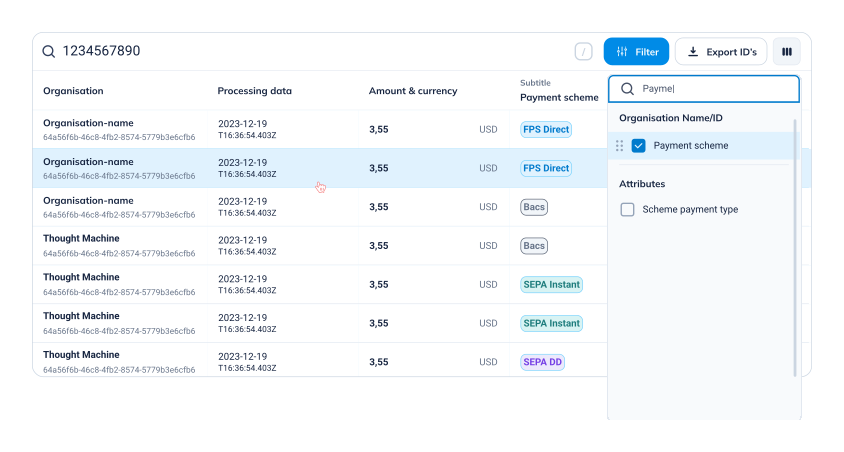
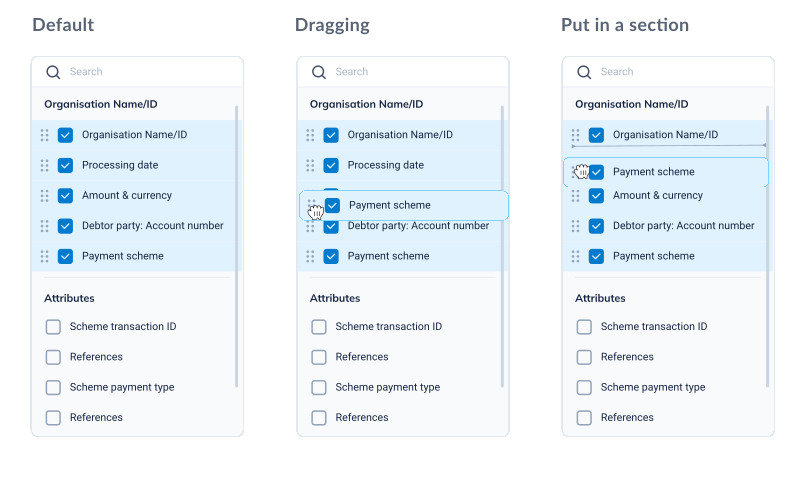
Support needed payment status, amount, and date. Engineers needed error codes and API responses. We enabled users to add, remove, and reorder columns based on their workflow.
Two teams, different workflows. A customizable table gave each team the information they needed.
One rigid view for two teams with opposite needs works for neither. Customization was the only honest solution.
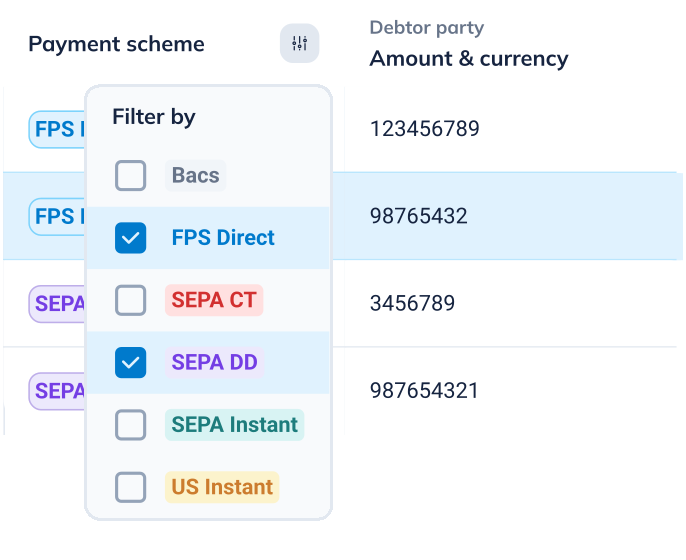
A failed payment handled as successful has real downstream costs. We introduced color coding for payment status, highlighted critical fields, and added inline filters for rapid refinement.
Clear status visibility reduced the risk of misinterpretation for users, support, and the business.
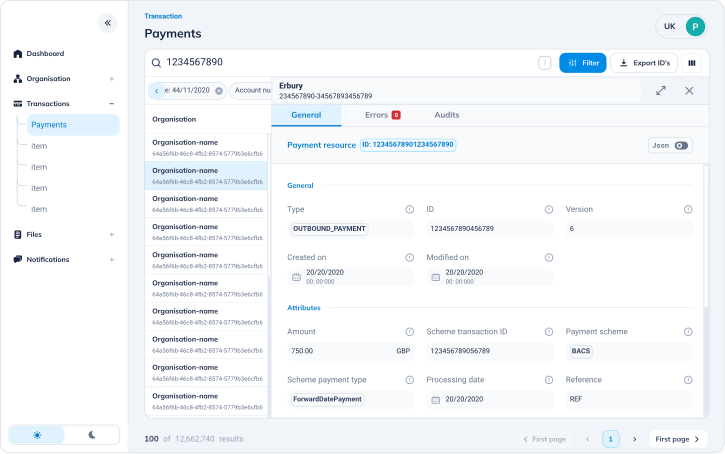
Support agents regularly opened 3–5 browser tabs to compare payments. We enabled them to open payment details without leaving the list view, removing the need for multiple tabs.
The workaround revealed a flaw in the original navigation model. We redesigned it to keep context throughout the investigation.
We came to improve a tool. We left with a business case for a new product.
The original question was: improve or deprecate? By the end, stakeholders were asking something different.
During research, enterprise clients were requesting access to payment data, they wanted to investigate their own transactions without calling support. A customer-facing version could reduce inbound support volume and become a premium offering.
The project reframed from "can we make support more efficient?" to "are we sitting on a product we haven't tried to sell?"
Security analysis was pending, but the business opportunity was clear. The project expanded from improving support workflows to exploring a new customer facing product.
Two metrics. One unexpected business case.
projected post-redesign
with filter system
first-ever baseline
6 support + 3 engineers
Projected to increase from 50% to 70%, reducing engineering escalations.
9 interviews shaped the design of 5 features, each tied to a specific research finding.
Manual search workflows became 10% faster with the new filter system.
Research revealed demand for a customer facing version of the tool, leading to an initial security assessment.
40 survey responses documented how the tool was actually being used for the first time.
Three things that changed how I think about internal tooling.
The data was there, but the tool didn't surface enough for support to investigate issues.
Tabs, spreadsheets, and manual cross referencing exposed clear gaps in the tool.
Enterprise clients wanted access to the same payment data, revealing a potential customer facing product.
Improving internal tools is about discovering what your team is capable of when the tool stops getting in the way.
And sometimes, what you build for your team turns out to be exactly what your customers needed too.
